PiXY
Multi
Screen
Browser


PiXY is a Browser that renders HTML code as bitmaps shared to multiple screens via a serial port.
Console
Elements
Source
Server
PiXY server transmits the rendered web page to Bluetooth-enabled devices.
npm install pixy-browser
A.
B.
C.
Sample Configuration:
const {PixyBrowser} = require('pixy-browser')

new PixyBrowser({
  url: 'http://my.site/index.html',
  devices: [
    {
      top: 50,
      left: 100,     // crop of device A
      bottom: 710,   // top side of rendered view
      right: 1440
    },
    {
      top: 0,
      left: 685,     // crop of device B
      bottom: 1050,  // right side of rendered view
      right: 1220
    }
  ],
  height:1050,       // window.screen.height
  width:1400         // window.screen.width
})
PlayStore App
Get the PiXY app for Android
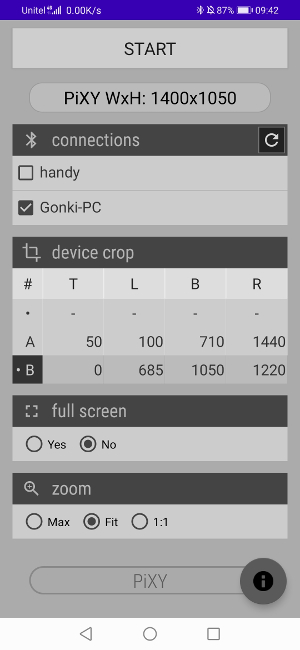
Select a connection, crop, and start:
Device A

Device B

PiXY in Browser
var callback = function(){alert('PiXY loaded')},
    container = document.getElementById('id'),
    url = 'http://my.site/static.html'

var pixy = new PixyBrowser({
    callback: callback,       // callback function
    container: container,     // container DOM element
    url: url,                 // webpage URL
    type: "matrix|canvas",    // canvas for large screens
    height: 240,              // height in pixels
    width: 360                // width in pixels
})

// when width and height are omitted PiXY will
// render the webpage as plain HTML

pixy.zoom( 1.5 )             // floating point number
Last update: May 2020
